Claude 工具调用怎么用?Claude Function Calling 教程(tool_use 完整示例,2026)
Claude 工具调用怎么用?这篇 Claude Function Calling 教程讲清 tool_use 的工作流程,演示工具定义、tool_result 回传、多工具并行调用和完整的 Agent 循环,介绍 SDK 的 Tool Runner、tool_choice 与 strict 严格模式,并说明 Opus 5.5 等新模型不支持强制调用工具时的写法。
SupaStore 开发者体验组 ·
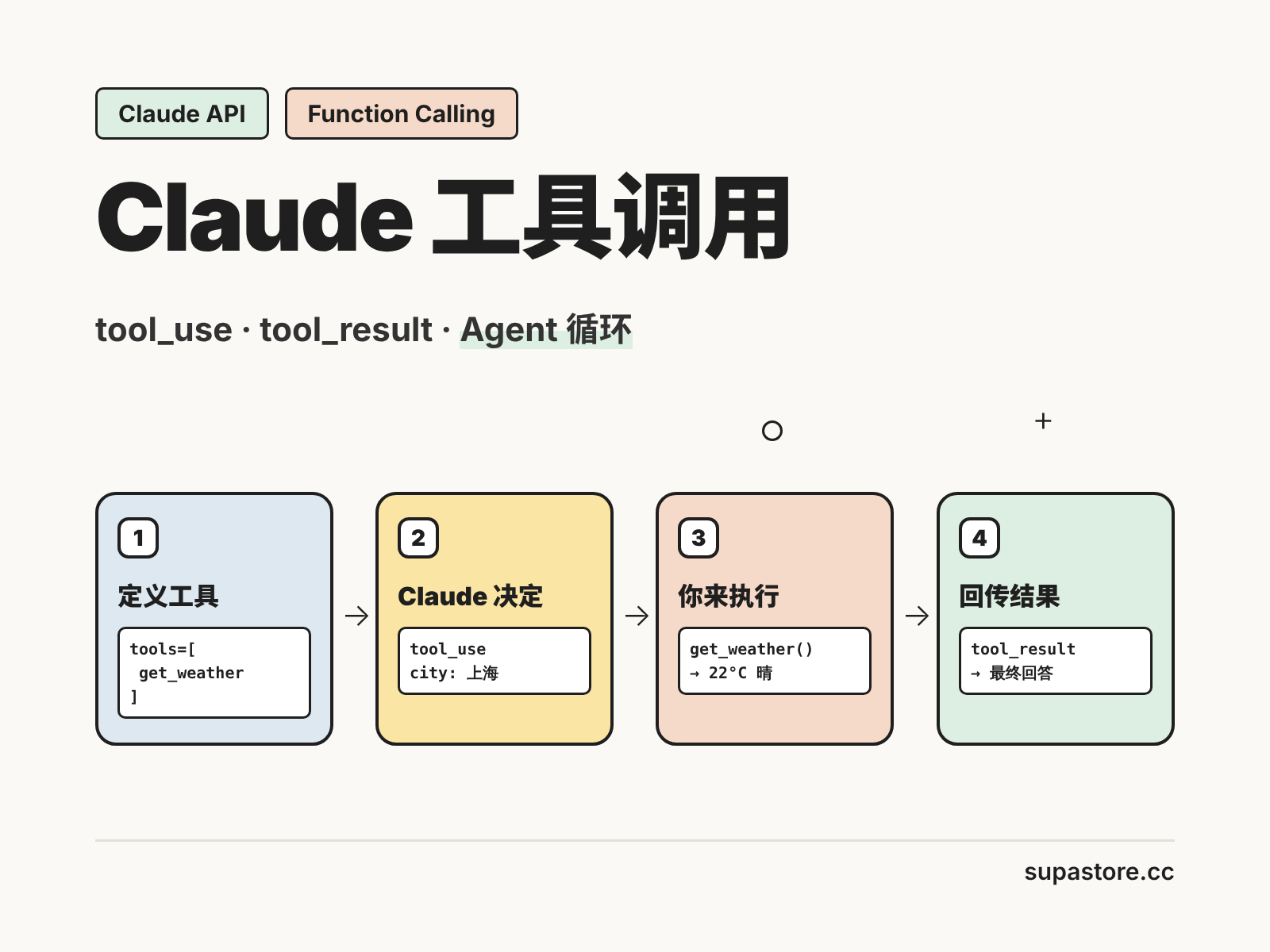
Claude 工具调用(Tool Use,也叫 Function Calling)让 Claude 不只会回答问题,还能调用你写好的函数:查天气、查订单、搜数据库、发邮件。你告诉 Claude 有哪些工具可用,它在需要时返回"我要调用哪个工具、参数是什么",由你的代码执行后把结果交回去,Claude 再给出最终回答。
这篇 Claude Function Calling 教程从工具定义开始,一步步演示 tool_use 和 tool_result 的完整流程、多工具调用和 Agent 循环,再介绍 SDK 的 Tool Runner 和严格模式。还没跑通基础调用的话,先看《Claude API 调用教程:Python 接入 Claude API 完整示例》。
Claude 工具调用的工作流程
一次完整的工具调用分四步:
- 你发请求:在
tools参数里定义可用的工具,连同用户问题一起发给 Claude; - Claude 决定调用:响应的
stop_reason为tool_use,内容里有一个tool_use块,写明工具名和参数; - 你执行工具:代码按参数调用真实函数,拿到结果;
- 你回传结果:把结果放进
tool_result块发回去,Claude 据此生成最终回答。
注意:工具始终由你的代码执行,Claude 只负责决定调用什么、传什么参数。
第一步:定义工具
每个工具需要 name、description 和描述参数的 JSON Schema input_schema:
tools = [
    {
        "name": "get_weather",
        "description": "查询指定城市的当前天气。用户询问天气、气温或是否下雨时调用。",
        "input_schema": {
            "type": "object",
            "properties": {
                "city": {"type": "string", "description": "城市名,例如:上海"},
                "unit": {
                    "type": "string",
                    "enum": ["celsius", "fahrenheit"],
                    "description": "温度单位",
                },
            },
            "required": ["city"],
        },
    }
]
写好工具定义的 4 个要点
- 名称具体:
get_current_weather比weather更好; - 描述写清"什么时候用":不只说工具做什么,还要说在什么情况下调用,新一代 Opus 模型调用工具更谨慎,触发条件写清楚效果明显;
- 每个参数都写说明,固定取值用
enum; - 只把真正必填的参数放进
required。
第二步:发起请求并处理 tool_use
import json
import anthropic

client = anthropic.Anthropic(base_url="https://api.supastore.cc/v1")

def get_weather(city: str, unit: str = "celsius") -> str:
    # 这里换成真实的天气接口
    return json.dumps({"city": city, "temp": 22, "unit": unit, "condition": "晴"})

messages = [{"role": "user", "content": "上海今天天气怎么样?"}]

response = client.messages.create(
    model="claude-sonnet-5-5",
    max_tokens=16000,
    tools=tools,
    messages=messages,
)

print(response.stop_reason)  # tool_use
for block in response.content:
    if block.type == "tool_use":
        print(block.name, block.input)  # get_weather {'city': '上海'}
tool_use 块包含三个字段:id(这次调用的编号)、name(工具名)和 input(参数,已解析为字典)。
第三步:回传 tool_result
把 Claude 的回复原样追加到对话里,再用一条 user 消息回传工具结果,tool_use_id 必须和 tool_use 块的 id 对应:
messages.append({"role": "assistant", "content": response.content})

tool_results = []
for block in response.content:
    if block.type == "tool_use":
        result = get_weather(**block.input)
        tool_results.append({
            "type": "tool_result",
            "tool_use_id": block.id,
            "content": result,
        })

messages.append({"role": "user", "content": tool_results})

final = client.messages.create(
    model="claude-sonnet-5-5",
    max_tokens=16000,
    tools=tools,
    messages=messages,
)
print(next(b.text for b in final.content if b.type == "text"))
工具执行失败怎么办
不要直接丢掉失败的调用,而是回传一个带 is_error 的结果,Claude 会根据错误信息调整:
{
    "type": "tool_result",
    "tool_use_id": block.id,
    "content": "Error: 找不到城市 'xyz',请提供有效的城市名",
    "is_error": True,
}
多工具调用与完整的 Agent 循环
Claude 可能在一次回复中调用多个工具(比如同时查北京和上海的天气),也可能根据第一个工具的结果再调用下一个。把上面的步骤放进循环,直到 Claude 不再调用工具:
TOOL_FUNCS = {"get_weather": get_weather}

messages = [{"role": "user", "content": "北京和上海哪个更热?"}]

while True:
    response = client.messages.create(
        model="claude-sonnet-5-5",
        max_tokens=16000,
        tools=tools,
        messages=messages,
    )
    if response.stop_reason != "tool_use":
        break

    messages.append({"role": "assistant", "content": response.content})
    tool_results = []
    for block in response.content:
        if block.type == "tool_use":
            func = TOOL_FUNCS[block.name]
            tool_results.append({
                "type": "tool_result",
                "tool_use_id": block.id,
                "content": func(**block.input),
            })
    # 同一轮的所有结果放进一条 user 消息里一起回传
    messages.append({"role": "user", "content": tool_results})

print(next(b.text for b in response.content if b.type == "text"))
关键点:同一轮的多个 tool_result 要放在同一条消息里回传。拆成多条消息,会让 Claude 逐渐不再并行调用工具。每一轮循环都会重新发送完整对话,工具结果越多、轮数越多,Token 消耗越大,记得配合 Prompt 缓存,方法见《Claude Prompt 缓存怎么用?Prompt Caching 教程》。
用 Tool Runner 自动处理循环
不想自己写循环,可以用 Python SDK 的 Tool Runner(目前为 beta):用 @beta_tool 装饰函数,SDK 会根据函数签名和文档字符串自动生成工具定义,并自动完成"调用 → 执行 → 回传"的循环:
import anthropic
from anthropic import beta_tool

client = anthropic.Anthropic(base_url="https://api.supastore.cc/v1")

@beta_tool
def get_weather(city: str, unit: str = "celsius") -> str:
    """查询指定城市的当前天气。

    Args:
        city: 城市名,例如:上海。
        unit: 温度单位,celsius 或 fahrenheit。
    """
    return f"{city} 当前 22 度,晴"

runner = client.beta.messages.tool_runner(
    model="claude-sonnet-5-5",
    max_tokens=16000,
    tools=[get_weather],
    messages=[{"role": "user", "content": "上海今天要带伞吗?"}],
)

for message in runner:
    print(message)
tool_choice 与 strict 严格模式
tool_choice:新模型不支持强制调用
tool_choice 默认是 {"type": "auto"},由 Claude 决定是否调用工具;{"type": "none"} 表示禁止调用。
需要特别注意:Opus 5.5、Sonnet 5.5、Fable 5.1 不支持强制调用工具,传入 {"type": "any"} 或 {"type": "tool", "name": ...} 会返回 400 错误。在这些模型上,改用 auto,并在提示词里写明"请使用 get_weather 工具回答";auto 不保证一定调用,代码里要检查是否真的出现了 tool_use 块。这类报错的排查方法见《Claude API 报错怎么办?2026 Claude API 错误码大全》。
strict:保证参数符合 Schema
在工具定义里加上 "strict": True,Claude 生成的参数一定符合 input_schema,不会缺字段或类型错误。使用严格模式时,Schema 中的每个对象都要设置 "additionalProperties": False:
tools = [{
    "name": "book_flight",
    "description": "预订航班。用户明确要求订票时调用。",
    "strict": True,
    "input_schema": {
        "type": "object",
        "properties": {
            "destination": {"type": "string"},
            "date": {"type": "string", "format": "date"},
            "passengers": {"type": "integer", "enum": [1, 2, 3, 4, 5, 6]},
        },
        "required": ["destination", "date", "passengers"],
        "additionalProperties": False,
    },
}]
如果调用工具只是为了拿到固定格式的 JSON,直接用结构化输出更合适,见《Claude 结构化输出怎么用?让 Claude API 稳定返回 JSON 的 3 种方法》。
Claude 工具调用的 Token 成本
工具定义本身会作为输入 Token 计费,每次请求都会发送;工具结果也会进入上下文。控制成本的方法:
- 只传入当前任务需要的工具,不要一次塞几十个;
- 工具结果只返回 Claude 需要的字段,不要把整个接口响应原样丢回去;
- 工具定义放在请求最前面且保持不变,便于命中 Prompt 缓存;
- 简单的路由、提取类工具调用可以用 Haiku 5.5,模型选择见《Claude Opus 和 Sonnet 有什么区别?》。
通过中转站调用时,确认服务商完整透传 tools、tool_choice 和 strict 字段,否则工具调用会失效,检测方法见《API中转站是什么?AI中转站选型避坑指南》。
常见问题 (FAQ)
Q: Claude 工具调用和 Function Calling 是一回事吗?
答: 是同一类能力,Anthropic 的官方名称是 Tool Use,Claude 在响应中返回 tool_use 块说明要调用的函数和参数,由你的代码执行后用 tool_result 回传结果。
Q: Claude 会自己执行工具吗?
答: 自定义工具不会,Claude 只决定调用哪个工具、传什么参数,真正的执行由你的代码完成;网页搜索、代码执行等官方服务端工具才由 Anthropic 在服务端执行。
Q: 为什么 tool_choice 设置为 any 会报 400?
答: Opus 5.5、Sonnet 5.5 和 Fable 5.1 不支持强制调用工具,需要改用 auto 并在提示词中说明要使用的工具,同时检查响应中是否真的出现了 tool_use 块。
Q: 多个工具结果应该怎么回传?
答: 同一轮回复中的所有 tool_use 执行完后,把对应的 tool_result 放在同一条 user 消息里一起回传,每个结果的 tool_use_id 都要与对应的 tool_use 块一致。
Q: 怎么保证 Claude 生成的工具参数格式正确?
答: 在工具定义中设置 strict 为 true,并在 input_schema 的每个对象中设置 additionalProperties 为 false,Claude 生成的参数就会严格符合 Schema。